My 20 Favorite T-Mobile G1 Android Apps and Three Must-Have Hardware Upgrades
I've had my G1 for a couple of months now, and I thought now would be a great time to publish my definitive list of favorite software and hardware add-ons and upgrades. You'll note that the majority of the software listed below is free, and all of it is available via the Android Market. Got to love Android!
Software
1. Touchdown (by Nitrodesk). Excellent Exchange client – even supports push email. Getting better by the week as well – the developers are really responsive to suggestions. ($30 via Android Market)
2. Meridian Video/Audio Player. Much better than the standard app. (Free)
3. aHome. Replacement GUI utility with dozens of free skins. It also has a pre-Cupcake on-screen keyboard that works for Google search and a couple of other apps. I bought the full version for additional features like loading skins on SD card – I think it was around $5.
4. Where. Cool app that combines restaurant ratings, movie listings, etc in one app, including Yelp! Free.
5. Twidroid. Best Twitter app I’ve found. Free.
6. ShopSavvy. Free app that scans bar codes and tells you where you can buy that item for less. Saved me over $200 when shopping for new kitchen drawer pulls!
7. 3banana. Allows you to create notes on Web and the G1 and syncs over the air. Also reads "2d" barcodes that contain URLs and other text info. Free.
8. Documents to Go (DataViz). View, create, edit .doc and .xls files and attachments on the G1. Currently not compatible with .xlsx and .docx, but supposed to be adding soon, along with PPT support. Around $30 on the Market.
9. Power Manager. Great utility that dynamically changes phone features (like WiFi, GPS, etc) based on triggers (like battery level). Free and ‘full’ version. I bought the full version because it’s a great app and I wanted to support the author.
10. T-Mobile My Account. Check your plan minutes, text message quantity, etc, plus pay your bill right from the phone. Free.
11. SnapPhoto. Free replacement camera app that detects stability before snapping the shutter. A little unstable but improving rapidly.
12. My Tracks. Uses GPS and keeps a track of where you’ve been, including lots of stats. You can then upload the maps to Google as KML or GPX files and share with friends. Works on road and off. Free.
13. Facebook Sync. Free utility that syncs your Facebook contacts’ pictures with the G1 (and Google) contacts.
14. Ringdroid. Allows you to edit any MP3 file and turn it into a ringer or notification tone. Free on the Market.
15. Pac-Man (Namco). Faithful port of the original game. Free.
16. NBA Gametime. Near real-time scores from the NBA playoffs, plus schedules. Free (but huge – 4MB!)
17. Metal Detector. Does what it says, using the compass to detect magnetic fields from metal. Makes iPhone owners green with envy, as the iPhone can’t do that (no compass)! Free.
18. Bubble. A real, working level for your G1. Free. Amaze your friends!
19. The Schwartz Unleashed. Cool light saber app. Yeah, I'm a geek. Free on the Market.
20. iLightr. Awesome lighter app. Uses the accelerometer to vary the flame, close the lid, etc. $0.99 on the Market. Great for concerts!
Hardware
1. Seidio 2600 MaH extended length battery, which doubled the phone’s runtime to around 30 hours, making the Power Manager app unnecessary unless you get lost in the wilderness. Makes the phone 5mm thicker but is soooo worth it. Retail is $60 but I bought mine used on eBay for $30. As an added bonus it comes with a replacement non-slip back cover.
2. Zagg Invisishield Film. For $25 you get a set of custom-cut, military grade films that adhere to the G1 and make it virtually scratch proof. The film was originally developed to cover helicopter rotors, so you know it's pretty darn tough. It covers the entire phone, not just the screen. You can get the screen-only version for $14.95 as well. I've had my Invisishield since I first purchased the phone two months ago and there is nary a scratch on it! Note: you will definitely want to purchase a non-slip cover after installing the Invisishield, as it does make the phone very slippery. This is solved by purchasing #1 above.
3. 16GB MicroSD Card. This card allowed me to put 1000s of songs and scores of videos on my phone. Way worth the investment.
Tuesday, May 26, 2009


Tuesday, May 19, 2009
The Top "Must-Have" Accessory for the T-Mobile G1
If you've read my previous post reviewing the T-Mobile G1, you'll know that my biggest complaint by far has been the lack of battery life. Having to carry a spare battery around and/or plug the unit in to the PC every chance you get is no way to live with a mobile device.
I finally broke down and bought the Seidio 2600 MaH extended battery, although I didn't pay retail for it (I purchased a barely used one from a private eBay seller for around $30 including shipping, instead of around $60 at retail). I was holding out because I didn't want to make my G1 any bulkier, but I just couldn't take it any more.
I'm pleased to report that the additional 5mm in thickness is hardly noticeable, and the battery adds virtually no weight to the unit. The battery also comes with a new back cover (as the battery is too thick for the standard cover). One advantage of the replacement cover is that it's non-slip, so you can put the phone in your shirt pocket and it won't fall out.
The best part of the upgrade is the extended run time. The best time I ever recorded with the "stock" G1 battery, with all features turned off other than basic phone and data functionality, was about 14 hours. Yesterday I used the phone extensively for 16 hours (including listening to music and a ton of Twitter/Web/email usage), and it still had 40% left when I plugged it in last night. By my calculations that would have yielded a total runtime of ~27 hours, and that was with heavy usage. With 'normal' usage I'd imagine I could squeeze a good 30 hours out of a charge.
So, if you have a G1 and you're losing your mind because you keep running out of juice, bite the bullet and buy the Seidio battery. It's worth every penny. Let's face it: the G1 will never be as slim as the iPhone, and unlike the iPhone, it's great to actually have the option of adding an extended battery to the unit. So, rather than pining after the iPhone's litheness, embrace your G1's rubenesque stature and rub the 30 hour runtime into the noses of your iPhone owning friends (as they run for the closest charger!).
If you've read my previous post reviewing the T-Mobile G1, you'll know that my biggest complaint by far has been the lack of battery life. Having to carry a spare battery around and/or plug the unit in to the PC every chance you get is no way to live with a mobile device.
I finally broke down and bought the Seidio 2600 MaH extended battery, although I didn't pay retail for it (I purchased a barely used one from a private eBay seller for around $30 including shipping, instead of around $60 at retail). I was holding out because I didn't want to make my G1 any bulkier, but I just couldn't take it any more.
I'm pleased to report that the additional 5mm in thickness is hardly noticeable, and the battery adds virtually no weight to the unit. The battery also comes with a new back cover (as the battery is too thick for the standard cover). One advantage of the replacement cover is that it's non-slip, so you can put the phone in your shirt pocket and it won't fall out.
The best part of the upgrade is the extended run time. The best time I ever recorded with the "stock" G1 battery, with all features turned off other than basic phone and data functionality, was about 14 hours. Yesterday I used the phone extensively for 16 hours (including listening to music and a ton of Twitter/Web/email usage), and it still had 40% left when I plugged it in last night. By my calculations that would have yielded a total runtime of ~27 hours, and that was with heavy usage. With 'normal' usage I'd imagine I could squeeze a good 30 hours out of a charge.
So, if you have a G1 and you're losing your mind because you keep running out of juice, bite the bullet and buy the Seidio battery. It's worth every penny. Let's face it: the G1 will never be as slim as the iPhone, and unlike the iPhone, it's great to actually have the option of adding an extended battery to the unit. So, rather than pining after the iPhone's litheness, embrace your G1's rubenesque stature and rub the 30 hour runtime into the noses of your iPhone owning friends (as they run for the closest charger!).
Tuesday, May 12, 2009
Two Months with the T-Mobile (HTC) G1 "Google Phone"


I've now had my G1 for a couple of months and I thought now would be a good time to add a thorough review of the unit.
Overall, I'm pleased with the G1. Before deciding to take the leap and re-up my contract with T-Mobile, I spent a long time playing with iPhones and G1s as I wanted to try to make sure I was making the right decision. While the iPhones are very cool phones (some people go so far as to call them the "Jesus Phone," the main deciding factor for me was overall price (the "total cost of ownership").
First off, T-Mobile offered me a really good deal on the G1 in exchange for signing up for another 2 year contract with them. As a plus for staying with them, they offered me a $49 unlimited voice plan (they call it their "loyalty plan"). T-Mobile's unlimited 3G data package is priced at $25 per monthm, including 400 messages, so for ~$64/month I get unlimited voice and 3G data. The same package on AT&T would run you about $129 a month (at least at the time I was comparing plans)! I have been really pleased with T-Mobile's customer support over the past five years, so staying with TMO was a big plus in my book as well.
Right out of the box, the G1 was really easy to set up. The G1 runs an operating system by Google called "Android", and as you might expect, it has tight integration with the various Google applications (calendar, email, and contacts). When you first power up the G1, it asks you to sign in with your Google account (or create one if you don't already have one). Once I had signed it, the G1 automagically synced all of the information from my Google account to my phone -- in about five minutes flat. It was almost a religious experience being able to have a fully populated, usable phone five minutes after first powering it up. The Google integration works very well -- changes on the phone are pushed to Google and vice versa, pretty close to real-time.
Once I had the basics populated in the phone, I began to explore the Android Market. The Market is a place where software developers can provide their products either for free or for a fee, similar to Apple's iPhone Market. The Android market has hundreds, perhaps thousands of free apps available, and many of them are useful and fully functional. To date I have probably downloaded 50 free apps and I have paid for 3 or 4. The apps I've paid for include TouchDown, an app that allows me to access my company's Exchange email/calendar/contacts and Documents to Go, which allows you to create, edit and view Microsoft Word and Excel documents. Both are very useful apps and well worth the money.Speaking of storage, the G1 has a MicroSD memory card slot that supports up to 16GB of storage. Unfortunately you can't store apps on the SD card, but you can store music, video, and photographs, plus certain apps can use SD for storage. The G1 comes with about 70MB of internal memory, and all loaded apps have to fit in that storage. Fortunately most apps are pretty small (like 512MB) and only a few exceed 1 or 2 MB, so you can cram a lot of apps into the phone's internal memory. I probably have 1000 songs and 20 videos on my phone and I still have half of the SD card available.
One really nice feature of the G1 is the screen. I watch video virtually every morning on the train ride in to work, and the G1's screen is gorgeous for watching video. The phone also includes YouTube, which can be watched "over the air" if you have a 3G or WiFi connection. Most video files do require transcoding (I use a utility called "Super Converter"), as the G1's screen resolution is smaller than most video files. This process is necessary for virtually any portable device to play video, BTW, and once you figure it out it's pretty simple. I'll write another blog entry later on describing the process in detail.
The G1 has a great physical keyboard, which was a big plus for me. I've been a Blackberry user for years and can't imagine using a phone without a real keyboard. Watching some of my friends try to use their iPhone virtual keyboards, coupled with my own experience with playing with various iPhones, only reinforced that impression. The keyboard does add some thickness to the unit over the iPhone, but it's worth it IMO. The G1's keyboard is so complete that there are only six characters that aren't accessible through a physical key, and I've gotten proficient enough on it that I'll bet I can manage 30 words a minute.
TMO is supposedly coming out with a "G2" in a few months that will have a touchscreen keyboard, and I expect that unit will be comparable in size to the iPhone. The keyboard is really easy to type on -- probably the best mobile keyboard I've ever used, and I've used lots of Blackberries and Palm devices over the years. Speaking of virtual keyboards, there is an operating system update (code named "Cupcake") rolling out starting this week that will update the G1 to add a virtual keyboard -- so it will have the best of both worlds!
One of the key considerations when buying a phone is how well it works as a phone (duh). I am pleased to report that the G1's phone works well. It has a pretty sensitive radio that is good at locking on to signal. The TMO coverage at my home is not wonderful, so it's a great place to test the sensitivity of various phones. The G1 performs quite well at my home and exhibits some of the best sensitivity that I've seen from any GSM phone, including the Blackberry Curve that I was using prior to the G1. One small problem at my home, incidentally: TMO hasn't finished building out their 3G network in Denver yet, and as such their 3G coverage ends about a mile from my house. I have high hopes that they will continue the rollout and that I will have 3G at my home in the near future. Fortunately, the G1 can also use WiFi for data connections, so I can just use that when I'm at home.
Speaking of 3G, T-Mobile's 3G network, when you're in a coverage area, works well. In downtown Denver, where my office is located, I routinely measure bandwidth in the 300kbps range. On a trip to Boston a month ago I measured over 600kbps! I'm not sure why Denver would be that much slower, but compared to the ~56kbps EDGE connections I was used to, even the slowest 3G connection is blazing fast.
The G1 has a really good Web browser, and couple that with the 3G network (or use WiFi) and you'll find that there are many times that you don't need to pull out a laptop to find things on the 'Net. As one might expect, the G1 has great search capabilities including a dedicated search button and the ability to perform voice search, both on the phone (contacts mostly) and on the Internet. For example, you can hold down the 'send' button, which invokes the voice search, and say 'movie theaters near 80128' -- and the phone will return a list of movie theaters. Very cool.
Other fun features of the G1 include a decent 3 megapixel camera with a real lens that actually focuses (although no flash). There are some innovative applications that use the camera to scan bar codes and then perform a Google search on the Internet to find the best price for the item. One of these applications, called ShopSavvy, saved me $250 when shopping for new drawer pulls for my kitchen. A home improvement store had the pulls for about $3.50 (plus tax), and I was able to scan the barcode and found the pulls on Amazon for $1.25. Amazing. There are tons of other apps available that do other cool things -- not a day goes by when I don't discover something new about the phone.
The main thing I don't like about the G1 (which is also the chief complaint of most iPhone users) is the battery life. If you use the phone minimally (eg no WiFi, GPS) you can get about 16 hours on a charge, although my average is more like about 12. One big difference with the G1, however, is that you can buy a spare battery for it and slip it in when you need extra juice. The iPhone's battery is sealed and non-interchangeable. For me, it's not a huge deal as I spend most of my time at my desk anyway, and I just plug the phone in halfway through the day to make sure I have enough juice for the rest of the day. You can also buy a replacement battery for about $50 that adds about 5mm to the thickness of the phone and gives you enough juice to make it through a day (maybe two).
Overall, I'm pleased with my decision to purchase the G1 and I'm glad I purchased it. T-Mobile's rate plans and five star customer service were a big consideration in my decision to stay with them, as I've been a TMO customer for 5 years and am very happy with them. I hope this review has been helpful!
Thursday, January 29, 2009
Verizon Wireless Launches Spendy Femtocell Product
Some times I think that VZW just doesn't have a clue when it comes to pricing and marketing their products. Other times I'm sure of it. This is one of those days.
VZW launched their long rumored "Femtocell" product the other day, which they named their "Wireless Network Extender." For those of us non-geeks, a Femtocell extends the wireless carrier's network by providing a small cell of coverage (generally in the 10 meter, or 30 foot, range) by carrying voice and data over a high-speed Internet connection back to the carrier's central "switch." This means that, if you a Femtocell installed at your home, for example, you'll have perfect mobile coverage (at the expense of using up a bit of your Internet bandwidth).
T-Mobile has had a similar service that uses WiFi (called Unlicensed Mobile Access) for a few years now, and I use it at home with my Blackberry 8230. UMA is a neat idea, particularly since it doesn't require any carrier-specific hardware--any vanilla WiFi access point will do. You can even use T-Mobile phones at some commercial hot spots. For example, I was able to get on to the WiFi at the Singapore airport and place a 30 minute call back to the US at normal (not roaming) rates.
Femtocells work a little differently. They support the carrier's native frequencies and technologies, instead of WiFi. In the case of VZW, this means a very weak CDMA signal is generated by the Femtocell--just enough to cover the footprint of a standard home or office.
So far, so good. Plug the Femtocell into your high-speed Internet connection, and all of a sudden you have perfect coverage. There are a few flaws in the VZW strategy, however:
1. The unit costs $250. Ouch.
2. When you place a call over the Femtocell, you still use minutes from your standard wireless plan. Even though you are paying to carry the call for most of the way back to VZW, and if they sell enough Femtocells it could feasibly mean they won't have to build out some portions of their network, they're not giving their users any break for helping them out. T-Mobile at least gives you the option of paying $10/month in exchange for unlimited UMA calls.
3. The VZW Femtocell actually has a GPS unit in it that prevents you from using it in places where you're not supposed to. UMA and some other Femtocells allow you to use your phone anywhere.
I think that VZW has to take a very hard look at their Femtocell strategy--it has a number of fatal flaws that will prevent widespread adoption, in my opinion.
Monday, January 26, 2009
Electronic Frontier Foundation: Free Your Phone Campaign
The EFF has started a petition to request the US Copyright Office grant an exemption to the DMCA that will allow phone users to unlock their phones to gain access to other mobile networks, the core phone O/S, etc.
Join the movement by signing their petition at http://www.freeyourphone.org/
The EFF has started a petition to request the US Copyright Office grant an exemption to the DMCA that will allow phone users to unlock their phones to gain access to other mobile networks, the core phone O/S, etc.
Join the movement by signing their petition at http://www.freeyourphone.org/
RIM Shares Retreat on Blackberry Storm Glitches
RIM shares dropped around 5% today on reports that glitches with the new Blackberry Storm were slowing user adoption. I reported earlier today in my 'Inspector Gadget' blog about those glitches, in case you're interested:
Looks like it's not a bad idea to hold off on purchasing that new Storm. RIM did issue a software update in December that cured some of the issues, but some Storm users I've spoken with have reported hardware issues (requiring unit swaps) in addition to software bugs.
I still think the Blackberry Bold is the best combination of features - I'm not sold on the soft/virtual keyboard, and the Bold is getting excellent reviews from the press as well as users.
Thursday, October 30, 2008
T-Mobile Blackberry Curve 8320 O/S Upgrade Rocks!
I have been anxiously waiting for T-Mobile to release the 4.5 upgrade for my Blackberry Curve (aka 8320) since Blackberry first announced the upgrade early this year. Apparently T-Mobile takes their time to QA O/S releases, because it took about 9 months for them to finally get this one out on the web site. They finally did release the upgrade on October 20th, and it was well worth the wait. (you can download the upgrade free at http://www.t-mobile.com/bbupgrade/ - T-Mobile customers only).
Key features of this upgrade include:
I've been using the upgraded O/S for about a day now, and other than a couple of weird "uncaught exception" errors when updating the "My Faves" list (which isn't a huge deal), it's been rock stable. True to their promise, UMA seems to be more stable, and the other features seem to work well. I am particularly happy with the HTML email viewing option and the ability to edit attachments.
Overall, I'm really pleased. The free upgrade turned my Curve from a so-so multimedia phone into a bit of a powerhouse. It still lacks 3G, of course, but on WiFi it really screams. Add to that the benefits of using UMA (gives me flawless coverage at my home, which usually is horrible), and I'm very pleased with the Curve, T-Mobile, and the new upgrade.
I have been anxiously waiting for T-Mobile to release the 4.5 upgrade for my Blackberry Curve (aka 8320) since Blackberry first announced the upgrade early this year. Apparently T-Mobile takes their time to QA O/S releases, because it took about 9 months for them to finally get this one out on the web site. They finally did release the upgrade on October 20th, and it was well worth the wait. (you can download the upgrade free at http://www.t-mobile.com/bbupgrade/ - T-Mobile customers only).
Key features of this upgrade include:
- Support for MicroSD cards up to 16GB (4GB was the previous max);
- Full stereo Bluetooth support
- YouTube now works with the Web browser (although it still doesn't seem to be fully Flash compatible)
- Video recording
- HTML email rendering (huge one for me--no more knarly HTML-laden email messages to wade through)
- Improved WMA support (this allows calling over WiFi)
- Limited email attachment editing (MS Word, for example) via a free version of Documents to Go
- Other miscellaneous stability enhancements
I've been using the upgraded O/S for about a day now, and other than a couple of weird "uncaught exception" errors when updating the "My Faves" list (which isn't a huge deal), it's been rock stable. True to their promise, UMA seems to be more stable, and the other features seem to work well. I am particularly happy with the HTML email viewing option and the ability to edit attachments.
Overall, I'm really pleased. The free upgrade turned my Curve from a so-so multimedia phone into a bit of a powerhouse. It still lacks 3G, of course, but on WiFi it really screams. Add to that the benefits of using UMA (gives me flawless coverage at my home, which usually is horrible), and I'm very pleased with the Curve, T-Mobile, and the new upgrade.
Wednesday, January 02, 2008
Mobile Blogging using Twitter
I just signed up for a new "micro blogging" service called Twitter. It's a neat idea--a spot that allows you to send little snippets of whatever makes sense to you--what you're doing, something you want to remember, etc., and have it stored in short blog snippets. To make it even easier, Twitter also supports SMS blogging--you just send what ever you want to post to an SMS address, and it gets automatically posted to Twitter.
You can do this with other blogging services as well, but Twitter seems ideally suited for SMS--short being the operative term. I'm going to give it a try and see how useful it is!
I just signed up for a new "micro blogging" service called Twitter. It's a neat idea--a spot that allows you to send little snippets of whatever makes sense to you--what you're doing, something you want to remember, etc., and have it stored in short blog snippets. To make it even easier, Twitter also supports SMS blogging--you just send what ever you want to post to an SMS address, and it gets automatically posted to Twitter.
You can do this with other blogging services as well, but Twitter seems ideally suited for SMS--short being the operative term. I'm going to give it a try and see how useful it is!
Thursday, October 25, 2007
10 Months with a Blackberry Pearl (8100)

I've been carrying Blackberries for several years now, and although I love the convenience and productivity that the devices provide, I always hated carrying a brick on my belt. When RIM announced the Pearl (also known as the 8100) in 2006, I was immediately interested, and after playing with one at my local T-Mobile store, I was hooked. I didn't buy one immediately, however--I waited until my contract was up and got a smoking deal on a new Pearl back in January 2007 ($50 after rebates, credits, etc).
Since that time, I have been really pleased with my Pearl. The device combines an extremely attactive size and weight with high functionality and usability. It has all of the features that I've always wanted in a Blackberry:
- Traditional cell phone size and weight: 4.2" long, 2" wide, .5" deep; 3 ounces
- Quad-band GSM coverage (works in 100+ countries) and EDGE data connectivity. Coverage on the T-Mobile network has been very good in my experience, and I've used it all over the US.
- Beautiful color screen
- Polyphonic ring tones, includng the ability to use MP3 songs as ringtones
- Bluetooth headset support
- Full support for Blackberry Enterprise Servers (BES)
- Trackball (provides x and y navigation)
- Audio and video playback, including the ability for phone calls to pause and restart music playback
- Camera: 1 megapixel camera, including a small flash
- Voice dialing: surprisingly accurate voice dialing feature makes placing calls without looking at the keyboard much easier
- Memory expansion (up to 2GB via flash chip)
- Customizable ringer profiles (you can assign custom ringers to different people)
- Good battery life: 15 days standby, 3.5 hours talk time
Those are the strong points of the unit. As you might guess, there are a few things I don't like about the Pearl:
- Battery life: the unit is 10 months old, and the battery rarely lasts more than 2 days on standby and 2 hours of talk time. I suppose this is to be expected, but buying a new battery every year is a pain.
- Lack of stereo Bluetooth support: the unit does not support the Bluetooth profiles that allow the new crop of wireless stereo headsets to work. Rumors have it that RIM will be adding support in a future release of the operating system.
- Proprietary headset jack: even though RIM provides a stereo headset (two earbuds with a microphone), the quality of sound reproduction is awful. Unfortunately, you can't just plug in any headset--the Pearl's headset jack is a proprietary 2.5mm design, which means that you have to buy an adapter.
- Keyboard: in order to fit all of the keys required into the small form factor of the Pearl, RIM developed a system called "Suretype" which allowed them to double up most keys (for example, both the A and the S are on a single key). The Pearl intelligently guesses which word you are typing--for example, if you type 'hello', you actually press a single key for each letter (GH-ER-L-L-OP keys), and the phone figures out which word you mean. In practice, this system works pretty well, but it's still no substitute for a full keyboard.
- Camera: I'd actually prefer not to have a camera on the phone, as certain companies and government installations will not permit camera phones on premise.
- Memory: it would be great to be able to put more than 2GB into the phone; since it can play movies, you can use up that amount of storage pretty quickly.
- EDGE: while EDGE data rates are much better than the old GPRS system, it's still painfully slow. Support for the new UMTS standard would provide close to broadband speeds (although carriers in the US are very slowly adopting UMTS, so it's probably a moot point unless you live in a country that has support).
- Web browsing: even with a "real" browser installed (I've been using Opera Mini), browsing the web is still a painful experience. This is due in part to slow EDGE data rates and also because of the lack of support for things like Java. The built-in Blackberry browser is OK, but I seem to have a lot of problems with timeouts when I'm using it.
In summary, I'm definitely pleased with my Pearl, and I would highly recommend it to anyone that wants the functionality of a Blackberry with the convenience and size of a regular cell phone. I have tried some of the newer, slimmer, full keyboard models (like the Curve), and I actually prefer the Pearl's keyboard--the newer units have such small keys that I think they're really hard to use (I have big fingers!). Nice job, RIM--keep up the good work!
Thursday, July 12, 2007
5 Big Reasons Why I Won't Buy an iPhone
A number of friends have asked me why I haven't already jumped on the bandwagon and purchased an iPhone like the other 700,000+ people that have already taken the plunge:
1. Price: I don't want to strap $600 to my hip, just ready to drop into the toilet, in the street, etc. My Pearl cost me $50 after rebates, 2 year contract, etc....and who knows--I wouldn't be surprised if there are stories of iPhones being stolen right off of people's belts!
2. Blackberry server: my Blackberry automatically syncs everything (email, contacts, calendar, etc) over-the-air with a server in our corporate data center. That means I never have to sync it with Outlook, and if I do drop it into the toilet, it takes 15 minutes to get the new one operational. The Blackberry server also allows me to do cool things like create/accept meeting invitations, look up anyone in the company directory, and lots of other cool features.
3. Capacity: the biggest iPhone only has 8GB of storage. My Pearl has 2GB that I rarely use, as I rely on my 30GB iPod Video for entertainment purposes. It plays music and video, but the iPod Video is still superior for entertainment.
4. Size: my Pearl weighs only 3 ounces and is 4"x2"x0.5" in size. The iPhone weighs nearly 5 ounces and is 4.5"x2.4"x0.5" in size. I really, really like the small size of the Pearl.
5. Battery: the iPhone has a permanently installed (soldered) battery that is not replaceable in the field. In contrast, it takes about 5 seconds to replace the Pearl's battery.
I'll wait for a while and see what develops. I like a lot of the features of the iPhone, but at this point the Pearl satisfies all of my main requirements.
A number of friends have asked me why I haven't already jumped on the bandwagon and purchased an iPhone like the other 700,000+ people that have already taken the plunge:
1. Price: I don't want to strap $600 to my hip, just ready to drop into the toilet, in the street, etc. My Pearl cost me $50 after rebates, 2 year contract, etc....and who knows--I wouldn't be surprised if there are stories of iPhones being stolen right off of people's belts!
2. Blackberry server: my Blackberry automatically syncs everything (email, contacts, calendar, etc) over-the-air with a server in our corporate data center. That means I never have to sync it with Outlook, and if I do drop it into the toilet, it takes 15 minutes to get the new one operational. The Blackberry server also allows me to do cool things like create/accept meeting invitations, look up anyone in the company directory, and lots of other cool features.
3. Capacity: the biggest iPhone only has 8GB of storage. My Pearl has 2GB that I rarely use, as I rely on my 30GB iPod Video for entertainment purposes. It plays music and video, but the iPod Video is still superior for entertainment.
4. Size: my Pearl weighs only 3 ounces and is 4"x2"x0.5" in size. The iPhone weighs nearly 5 ounces and is 4.5"x2.4"x0.5" in size. I really, really like the small size of the Pearl.
5. Battery: the iPhone has a permanently installed (soldered) battery that is not replaceable in the field. In contrast, it takes about 5 seconds to replace the Pearl's battery.
I'll wait for a while and see what develops. I like a lot of the features of the iPhone, but at this point the Pearl satisfies all of my main requirements.
Thursday, June 21, 2007
How to use a normal stereo headset with the Blackberry Pearl 8100
I purchased a Blackberry Pearl about 3 months ago, and have been really happy with it--with one big exception: the device has a proprietary headset jack, and the stereo headphones (earbuds) that ship with the device don't have the best audio quality--music is muffled and they don't have the greatest high-end range.
Ideally, I'd like to be able to use one of the new Jabra Bluetooth stereo headsets with the Pearl, but the Pearl doesn't currently support the required Bluetooth profile (A2DP) to make them work (hopefully a device update will fix this problem in the near future).
In the meantime, the best solution is to purchase a $15 adapter from eAccess Solutions that will convert the proprietary 4 conductor, 2.5mm Blackberry jack into a standard 3.5mm headset jack. The adapter has one other cool feature--it also has a microphone and answer button, allowing you to take calls when they come in with the same headset.
This adapter will be on my list of "must have" accessories until such a time as I can use a wireless stereo headset!
I purchased a Blackberry Pearl about 3 months ago, and have been really happy with it--with one big exception: the device has a proprietary headset jack, and the stereo headphones (earbuds) that ship with the device don't have the best audio quality--music is muffled and they don't have the greatest high-end range.
Ideally, I'd like to be able to use one of the new Jabra Bluetooth stereo headsets with the Pearl, but the Pearl doesn't currently support the required Bluetooth profile (A2DP) to make them work (hopefully a device update will fix this problem in the near future).
In the meantime, the best solution is to purchase a $15 adapter from eAccess Solutions that will convert the proprietary 4 conductor, 2.5mm Blackberry jack into a standard 3.5mm headset jack. The adapter has one other cool feature--it also has a microphone and answer button, allowing you to take calls when they come in with the same headset.
This adapter will be on my list of "must have" accessories until such a time as I can use a wireless stereo headset!
Thursday, January 11, 2007
How to get out of your mobile phone contract without paying termination fees
I found out about Cellswapper.com today, which is a service that matches people that need to get out of their cell phone contracts with people that want to get into a shorter-term contract than is normally offered by the carriers. In addition, most people getting out of their contracts also throw in their phone for free.
CellSwapper does this by exploiting a little-known fact about mobile phone carrier contracts: that most carriers will waive early termination fees (which generally range from $150 to $200) if the subscriber can find someone willing to take over the contract for the remaining period of time (that way they're guaranteed that someone will pay off the contract). The company plays "match maker", matching people that want to get out of a contract with people that want to get into a contract--and charging modest fees for the service -- either a "success fee" of $14.95 after the person successfully finds a contract buyer (charged afterward), or a $9.95 "posting fee" if the contract holder pays up-front.
I checked out the Cellswapper service, and they had contracts listed from virtually every carrier, including both individual as well as shared minute plans. Some people even offered a cash bonus (like $50) if someone takes over their plans, plus free shipping for the phone. The contract lengths varied from 4 to 20 months (I'm not sure why anyone would take over a 20 month plan, especially since the person didn't offer any other incentives other than a free phone).
I think this is a great idea--I've been stuck into mobile phone contracts before, and neither the prospect of having to pay $50+/month until the contract is up or paying a ridiculous early termination fee were very attractive. It's great to know that there is another alternative. I'm interested if any of my readers have used CellSwapper--please post your experience with the service as a comment.
I found out about Cellswapper.com today, which is a service that matches people that need to get out of their cell phone contracts with people that want to get into a shorter-term contract than is normally offered by the carriers. In addition, most people getting out of their contracts also throw in their phone for free.
CellSwapper does this by exploiting a little-known fact about mobile phone carrier contracts: that most carriers will waive early termination fees (which generally range from $150 to $200) if the subscriber can find someone willing to take over the contract for the remaining period of time (that way they're guaranteed that someone will pay off the contract). The company plays "match maker", matching people that want to get out of a contract with people that want to get into a contract--and charging modest fees for the service -- either a "success fee" of $14.95 after the person successfully finds a contract buyer (charged afterward), or a $9.95 "posting fee" if the contract holder pays up-front.
I checked out the Cellswapper service, and they had contracts listed from virtually every carrier, including both individual as well as shared minute plans. Some people even offered a cash bonus (like $50) if someone takes over their plans, plus free shipping for the phone. The contract lengths varied from 4 to 20 months (I'm not sure why anyone would take over a 20 month plan, especially since the person didn't offer any other incentives other than a free phone).
I think this is a great idea--I've been stuck into mobile phone contracts before, and neither the prospect of having to pay $50+/month until the contract is up or paying a ridiculous early termination fee were very attractive. It's great to know that there is another alternative. I'm interested if any of my readers have used CellSwapper--please post your experience with the service as a comment.
Tuesday, January 09, 2007

Apple Unveils the iPhone
OK, so I missed the date of the iPhone announcement by a day--but other than that, many of my prognostications about Apple's much awaited iPhone came true--with one big exception.
Steve Jobs announced the phone at the Macworld Conference today in San Francisco, describing it as three products in one: "a widescreen iPod with touch controls, a revolutionary mobile phone, and a breakthrough Internet communications device." OK, so I got two out of three right--I didn't see the Internet communications device coming, whatsoever.
First, the phone is indeed a quad band GSM "world phone" with high-speed EDGE data connectivity (OK, I nailed it so far), but it also offers WiFi connectivity (I totally missed that one!). Apple inexplicably partnered with Cingular, so you'll need to be a Cingular customer to buy the phone, and I would imagine that it will be next to impossible to get an unlocked version of the iPhone (that could be used on other carrier's networks). I believe that this is a poor move on Apple's part--even though Cingular is the largest wireless carrier in the US, an exclusive relationship automatically cuts out T-Mobile's ~23 million subscribers as potential customers (Cingular has around 42 million subscribers). If Apple had instead chosen to go with a carrier-neutral strategy, it would therefore have had access to a whopping 65 million potential users--and that's just in the U.S. The total GSM user base, world-wide, is over 2 billion subscribers in 212 countries!
The iPhone will be released in June, feature flash memory capacities in either 4GB or 8GB increments, priced at $499 and $599 respectively (no word on whether these prices will be with a contract or not--if not, then subtract a couple of hundred dollars from the price, and all of a sudden the iPhone starts to look much more appealing!). It will also feature a 2 megapixel digital camera, will send and receive email and surf full-size web pages. The big news is that the iPhone will also sport a touch screen--a first for Apple--and a beautiful 3.5 inch high-res screen. Another interesting tidbit is that the iPhone actually runs OS X - the Macintosh operating system - and not the iPod embedded OS.
My analysis of the announcement? Probably one of the most awesome engineering feats that I have seen in mobile phone handsets. Clearly targeted at consumers (no support for email attachments, for example). Severely limited market through the exclusive partnership with Cingular, by pricing the device so that it will appeal only to the high end of the consumer market. I think this actually makes sense--Apple doesn't want to sabotage their core iPod market (particularly the high end iPods).
That said, there is no doubt that legions of loyal iPod users ready to line up to get the latest and greatest gadget from Apple--and I very well may be one of them!
One more wrinkle--Cisco actually owns the trademark on 'iPhone'--expect a lawsuit to be filed in the next couple of days. Apparently Apple has been trying to negotiate the use of the name with Cisco, and ran out of time--and now they're going to have to get it through litigation or change the name of the phone. This will be an interesting case to follow.
Thursday, January 04, 2007
The Apple iPhone - Why I Think it's the Real Deal
Rumors have been circulating for months (years?) that Apple will be announcing an 'iPhone' in the near future (perhaps as soon as next Monday, January 8). I believe that the time is ripe for an announcement for the following reasons:
1. Steve Jobs himself hinted last summer that some sort of phone was under development.
2. Rumors have circulated for some time of a number of iPhone prototypes that have been commissioned; one potential design appears below:
 3. Apple is in a perfect position to capitalize on the convergence of entertainment devices and mobile phones, and the integration of the iPod, which already has many PDA-like features (including a calendar and contact list), with a phone is a natural. I believe that very few companies other than Apple could successfully pull this off, but Apple's history of stellar design (hardware, software and user interface), coupled with the tremendous brand pull-through of the iPod line, could very well create another smash hit.
4. Apple has already dabbled in this market with 2005's partnership with Motorola that produced the ROKR, which was the first mobile phone that could play music from iTunes. An iPod it was not, but clearly Apple was testing the waters to see if that sort of device would "play" (pun intended) in the market. While the ROKR was basically a failure, I don't blame Motorola--Apple intentionally handicapped the ROKR's music storage ability so that it would not compete with the iPod line.
I do have some tripidation about the design of the iPhone, however. Hopefully Apple thought of the following:
1. Global coverage: the iPhone should be a quad-band GSM "world phone", which will provide a global market. There are rumors that Apple may enter into an agreement to resell another carrier's service (much like Virgin Mobile, which resells Sprint)--I think this would be a serious mistake on Apple's part. They should focus on making the best darn phone they can--and let the mobile carriers do what they do best--running wireless networks and selling handsets.
2. Audio: of course, the phone needs to have audio playback capabilities. Since the device will be in constant motion, a flash device (similar to the iPod Nano) would be a necessity. Capacity should be at least 4GB, and 8-10GB would be even better.
3. Video: a screen that's at least able to display some video (vis a vis the iPod Video) would be desirable. While the device would not have a lot of memory to store video, this would leave the door open for streaming video--particularly with 2.5G and 3G data network adoption finally on the uptake.
4. PDA: the ability to store calendar and address book entries is a necessity. Since the iPods already do this via iTunes, this shouldn't be a problem. One more PDA function that the iPods lack is "memo pad" capability--the ability to store free-form notes, and ideally sync them with email programs like Outlook, would be a really good feature.
5. Connectivity: Bluetooth is a must, both for wireless headset support as well as the ability to use Bluetooth for synchronization with iTunes. Ideally, the iPhone would support the latest Bluetooth profiles, which include support for the latest generation of combined stereo headphones and headsets like the Jabra BT620S .
6. Size and weight: based on the success of the Motorola RAZR, smaller is definitely better--and so is thinner. An iPhone should have a similar size and weight to a PDA phone, such as the Blackberry Pearl.
7. Battery life: this is of the essence. Obviously, iPhone buyers will want long talk time coupled with long listening time...and the phone should have some sort of mechanism that would prevent audio/video playback from completely draining the phone to the point where it is unusable.
8. Price: this is crucial. If Apple can price the iPhone such that the total price, with a 2 year contract, comes in around the $300 mark, then they will capture the attention of people that are considering the purchase of an iPod (and have budgeted the money).
We'll see how close predictions/advice come to reality when Apple (hopefully) announces the iPhone next week! If Apple can pull this off, the iPhone (or whatever they call it) could wind up being the hottest mobility gadget since the cell phone first hit the market!
Rumors have been circulating for months (years?) that Apple will be announcing an 'iPhone' in the near future (perhaps as soon as next Monday, January 8). I believe that the time is ripe for an announcement for the following reasons:
1. Steve Jobs himself hinted last summer that some sort of phone was under development.
2. Rumors have circulated for some time of a number of iPhone prototypes that have been commissioned; one potential design appears below:
3. Apple is in a perfect position to capitalize on the convergence of entertainment devices and mobile phones, and the integration of the iPod, which already has many PDA-like features (including a calendar and contact list), with a phone is a natural. I believe that very few companies other than Apple could successfully pull this off, but Apple's history of stellar design (hardware, software and user interface), coupled with the tremendous brand pull-through of the iPod line, could very well create another smash hit.4. Apple has already dabbled in this market with 2005's partnership with Motorola that produced the ROKR, which was the first mobile phone that could play music from iTunes. An iPod it was not, but clearly Apple was testing the waters to see if that sort of device would "play" (pun intended) in the market. While the ROKR was basically a failure, I don't blame Motorola--Apple intentionally handicapped the ROKR's music storage ability so that it would not compete with the iPod line.
I do have some tripidation about the design of the iPhone, however. Hopefully Apple thought of the following:
1. Global coverage: the iPhone should be a quad-band GSM "world phone", which will provide a global market. There are rumors that Apple may enter into an agreement to resell another carrier's service (much like Virgin Mobile, which resells Sprint)--I think this would be a serious mistake on Apple's part. They should focus on making the best darn phone they can--and let the mobile carriers do what they do best--running wireless networks and selling handsets.
2. Audio: of course, the phone needs to have audio playback capabilities. Since the device will be in constant motion, a flash device (similar to the iPod Nano) would be a necessity. Capacity should be at least 4GB, and 8-10GB would be even better.
3. Video: a screen that's at least able to display some video (vis a vis the iPod Video) would be desirable. While the device would not have a lot of memory to store video, this would leave the door open for streaming video--particularly with 2.5G and 3G data network adoption finally on the uptake.
4. PDA: the ability to store calendar and address book entries is a necessity. Since the iPods already do this via iTunes, this shouldn't be a problem. One more PDA function that the iPods lack is "memo pad" capability--the ability to store free-form notes, and ideally sync them with email programs like Outlook, would be a really good feature.
5. Connectivity: Bluetooth is a must, both for wireless headset support as well as the ability to use Bluetooth for synchronization with iTunes. Ideally, the iPhone would support the latest Bluetooth profiles, which include support for the latest generation of combined stereo headphones and headsets like the Jabra BT620S .
6. Size and weight: based on the success of the Motorola RAZR, smaller is definitely better--and so is thinner. An iPhone should have a similar size and weight to a PDA phone, such as the Blackberry Pearl.
7. Battery life: this is of the essence. Obviously, iPhone buyers will want long talk time coupled with long listening time...and the phone should have some sort of mechanism that would prevent audio/video playback from completely draining the phone to the point where it is unusable.
8. Price: this is crucial. If Apple can price the iPhone such that the total price, with a 2 year contract, comes in around the $300 mark, then they will capture the attention of people that are considering the purchase of an iPod (and have budgeted the money).
We'll see how close predictions/advice come to reality when Apple (hopefully) announces the iPhone next week! If Apple can pull this off, the iPhone (or whatever they call it) could wind up being the hottest mobility gadget since the cell phone first hit the market!
Wednesday, November 08, 2006
Cheap (~$350), Hackable Linux Smartphone Due Soon
FIC introduced the "Neo1973" Smartphone at the Open Source in Mobile conference yesterday in Amsterdam. Linux Devices, in an article yesterday, reported that the company will be releasing the device, which features an open-source, Linux-based "OpenMoKo" platform. The device will also support Windows Mobile, making it one of (possibly the) first dual-OS mobile device.
The Neo1973 will also include a GPS receiver, and it is a quad-band GSM/GPRS "world phone". The main weaknesses in the device (that I can see) are is the design of the unit, which resembles a large pill, and the fact that is does not appear to have any hardware buttons--everything seems to be controlled via a touch screen, and the fact that it doesn't include EDGE data--GPRS-only data rates are going to be a serious impediment to the acceptance of this unit by early adopters, geeks, and the like.

Nonetheless, the Neo sounds like a really great idea...and hopefully the price, which at $350 is hardly "cheap," will come down as they move into volume production. The carriers, if they decide to pick up the phone, will of course offer steep discounts in exchange for a contract commitment--the key, of course, is if this phone goes mainstream enough for that to happen.
The full article on LinuxDevices may be found here.
FIC introduced the "Neo1973" Smartphone at the Open Source in Mobile conference yesterday in Amsterdam. Linux Devices, in an article yesterday, reported that the company will be releasing the device, which features an open-source, Linux-based "OpenMoKo" platform. The device will also support Windows Mobile, making it one of (possibly the) first dual-OS mobile device.
The Neo1973 will also include a GPS receiver, and it is a quad-band GSM/GPRS "world phone". The main weaknesses in the device (that I can see) are is the design of the unit, which resembles a large pill, and the fact that is does not appear to have any hardware buttons--everything seems to be controlled via a touch screen, and the fact that it doesn't include EDGE data--GPRS-only data rates are going to be a serious impediment to the acceptance of this unit by early adopters, geeks, and the like.

Nonetheless, the Neo sounds like a really great idea...and hopefully the price, which at $350 is hardly "cheap," will come down as they move into volume production. The carriers, if they decide to pick up the phone, will of course offer steep discounts in exchange for a contract commitment--the key, of course, is if this phone goes mainstream enough for that to happen.
The full article on LinuxDevices may be found here.
Monday, October 30, 2006
An excellent review on one of the new crop of standalone phones that use Skype over WiFi connections. Nice idea, but it sounds like it's not quite ready for prime time--missing features like a Web browser (for authenticating with hotspots like the T-Mobile network), a keypad lock, text messaging, no support for 802.1x and WPA2 security and a high price (~$200 street) will doom this device to being used only by early adopters. Still....the ability to make Skype calls from virtually any open hotspot, without booting a PC is compelling. Perhaps the next generation of this phone will have the magic combination of ingredients, but for now I'm keeping my money in the bank.
Netgear Skype WiFi Phone SPH101 > JiWire's Review
Netgear Skype WiFi Phone SPH101 > JiWire's Review
Wednesday, September 13, 2006
The Greenphone - User-modifiable Linux Phone
Trolltech has introduced the Qtopia Greenphone, a $700 Linux-based GSM/GPRS mobile phone that includes an SDK so that users can easily develop their own applications that run on the phone.

From the press release:
-----------------------
Cool idea, but at that price point they will only attract serious gadget geeks (probably not their target market) and independent software vendors (ISVs) that desire a mobile phone platform that's easy to develop on (probably their target market). There could also be a market in the enterprise space--large companies that desire 100% control over the mobile phones that their employees use, all the way down to the OS.
Hopefully they come up with different colors--the Greenphone's puke green is not going to attract many people on wow factor! Of course, one might expect nasty things to come from a company called TrollTech...makes me wonder what it smells like! (?)
Trolltech has introduced the Qtopia Greenphone, a $700 Linux-based GSM/GPRS mobile phone that includes an SDK so that users can easily develop their own applications that run on the phone.

From the press release:
-----------------------
Trolltech®, the company that makes software faster to build and easier to use, announced the pricing and availability of Qtopia® Greenphone™, the first open Linux mobile device for application developers.
Greenphone is offered as part of a complete software development kit (SDK) enabling application developers to utilize communication functions and features found in today’s sophisticated smartphones in developing their own innovative applications in addition to modifying those that Trolltech provides.
----------------------Cool idea, but at that price point they will only attract serious gadget geeks (probably not their target market) and independent software vendors (ISVs) that desire a mobile phone platform that's easy to develop on (probably their target market). There could also be a market in the enterprise space--large companies that desire 100% control over the mobile phones that their employees use, all the way down to the OS.
Hopefully they come up with different colors--the Greenphone's puke green is not going to attract many people on wow factor! Of course, one might expect nasty things to come from a company called TrollTech...makes me wonder what it smells like! (?)
Friday, September 08, 2006
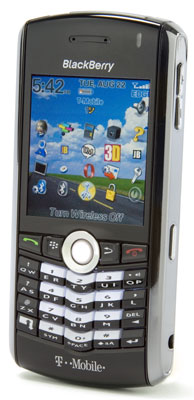
New Multimedia BlackBerry - The Pearl
RIM has announced its first consumer-targeted device, known as the BlackBerry Pearl. From the outside, it looks very much like the other "compact" BlackBerry devices, aka the 7100 series.
Inside, however, it sports two firsts for a BlackBerry: an MP3 player and an integrated 1.3 megapixel digital camera. It also has a new slot for a microXD memory card, which can be used for storing photos and music. Also very important: this unit supports both GPRS and EDGE data standards, the latter of which provides data rates up to three times faster than GPRS. As far as I know, this is the first BlackBerry in the "compact" form factor to support EDGE.
I haven't seen one of these units up close yet, but it looks like RIM could very well have a runaway hit on its hands. With a street price of $200-$300 (depending on plan and carrier discounts), weighing in at only 3.1 ounces and with a form factor that is as thin as a closed RAZR and as narrow as a normal "candy bar" phone, this unit sounds like a winner to me.
It does not appear to be available quite yet--T-Mobile, for example, it taking pre-orders at this time, but I'm sure we'll be seeing Pearls all over in a very short period of time.
RIM BlackBerry Pearl review by PC Magazine
Wednesday, September 06, 2006

Netgear WPN824 WiFi Router with MIMO
I acquired this unit for my office about two weeks ago from Office Depot for $89, and so far I am very pleased with it. This is an 802.11b/g WiFi router that features MIMO (Multi-In/Multi-Out) technology, which selects a combination of seven different internal antennas to provide the best coverage, depending on environmental factors such as the location of the wireless client devices. The router continuously monitors the environment, choosing the right channel and antennas to provide the best coverage.
Anecdotally, the new router does seem to provide better coverage in our office, with stronger signal in the furthest corners. An additional challenge of our office is the fact that we're in a highly dense area (downtown Denver), with many different APs from many different companies in the same area. Since this device automatically picks the best channel, it can dynamically change its configuration as the wireless dynamics in our building change.
So far, I am very pleased with the device and would recommend it to others. The price is a bit high, but it seems to be worth it for people that have coverage problems. My only complaint so far is the configuration of the unit, which required installation of a CD on the PC, along with a hard-wired connection to the router. While this wasn't a big deal for the initial configuration, I have been unable to manage the unit over the wireless, which is annoying--the last thing I want to do is to have to walk a laptop over to the unit to connect to the wired Ethernet just to be able to manage the device. Hopefully it will be very stable and I won't have to manage it!
Oh, and one more benefit--the unit has a very cool array of blue LEDs that shows which antennae are in use--a definite "thumbs up" on the geek factor!
Monday, August 28, 2006
 A new generation of ultra-mobile PCs
There is a great slideshow on the eWeek Web site that depicts the new generation of ultra-mobile PCs from Sony and OQO which run Windows XP and typically weigh 1-2 pounds. Some have slide-out keyboards, and a number of people that have reviewed these devices have been none too pleased with them...that said, I'm sure there is a market for these devices in sales and executive types that are always on the search for the smallest, lightest laptop that still runs XP.
My main problem with these devices is that the keyboards are usually just awful--like trying to type on a bunch of chiclets--and the manufacturers often compromise sturdiness (and roadworthiness) in lieu of weight and size. As always, it will be very interesting to watch these devices hit the market, and to see who is buying them.
Subscribe to:
Posts (Atom)